
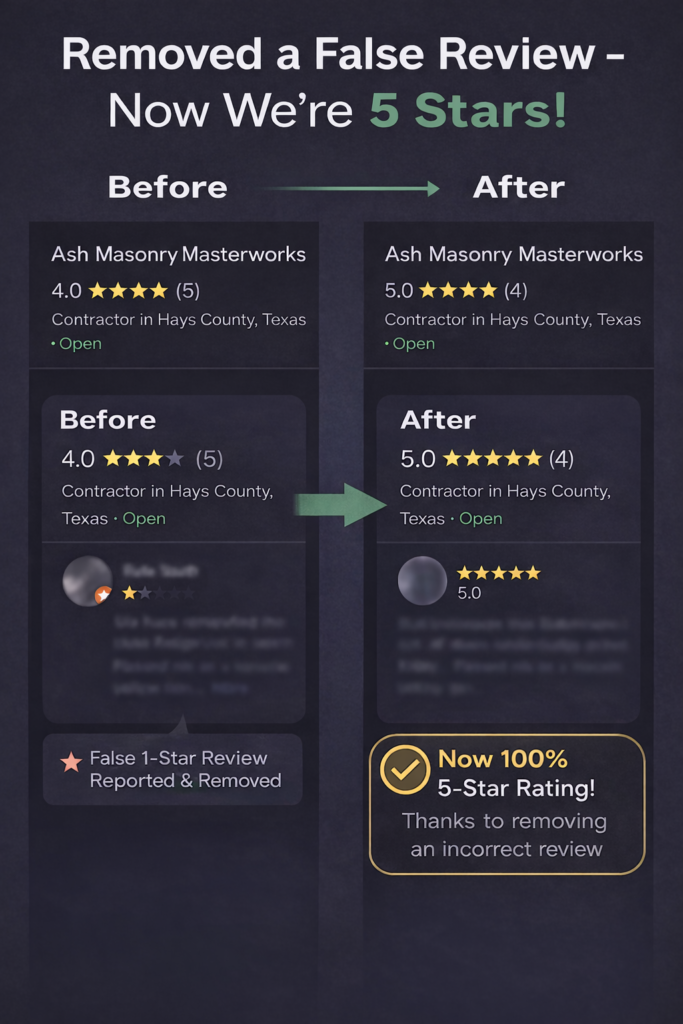
If a bad Google review just showed up on your business profile, your first instinct is probably to make it disappear. Here’s the honest version of how that actually works in 2026 — what you can remove, what you can’t, and the steps Austin business owners can take today.
Can a business owner delete a Google review?
No. You cannot delete a Google review yourself, no matter how unfair it is. The only people who can make a review vanish are the customer who wrote it and Google. As the business owner, your only lever is to flag the review and ask Google to evaluate it against their content policies. Google then decides whether it stays or goes.
That distinction matters, because it saves you from chasing a “delete” button that doesn’t exist. A review being negative, harsh, or even flat-out wrong is not enough on its own. Google protects a customer’s right to share an honest experience, even a scathing one.
Which Google reviews can actually be removed?
Google only removes reviews that clearly break one of its content policies. Before you flag anything, match the review to a specific violation — vague reports get rejected. The categories that genuinely qualify:
- Spam or fake — a fake account, a reviewer with no history, or content that looks templated or coordinated
- Conflict of interest — a competitor, a former employee, or anyone with a stake in your rating posing as a customer
- Off-topic — the review describes a different business, or has nothing to do with your services
- Harassment or hate speech — personal attacks, slurs, or targeting based on identity
- Personal information — phone numbers, addresses, or other private details
- Restricted or illegal content — profanity, threats, or anything Google prohibits outright
If your review doesn’t clearly fit one of these, removal is unlikely. Trying to force a regular complaint into the “off-topic” box almost always fails — and burns credibility on your future reports.
How to remove a Google review (step by step)
You have three ways to flag, and using more than one improves your odds. The Reviews Management Tool is the best of them because it gives you a status you can track.
1. Flag from Google Maps or Search
Search your business, open the review, click the three dots next to it, choose Report review or Flag as inappropriate, then pick the violation category that fits best. Anyone can flag this way, but it’s the least trackable.
2. Flag from your Google Business Profile
Signed in to the account that manages your profile, go to your reviews, find the one you want gone, and report it. This carries more weight because it’s tied to your verified business.
3. Use Google’s Reviews Management Tool
This is the one to prioritize. Confirm the email tied to your Business Profile, pick your location, report the review, and choose the most accurate category. The tool shows you a live status — “Decision pending,” “Review removed,” or “No policy violation” — so you’re not left guessing.
Before you submit anything, screenshot the review with the date and note any proof it’s fake: a service you don’t offer, a location that isn’t yours, an event that never happened. Specific, factual evidence is what gets reviews pulled.
What to do when Google says no
Plenty of valid reports get denied on the first pass, often by an automated screen. Don’t quit there. You get a one-time appeal through the Reviews Management Tool — select the denied review, then make a tight, factual case naming the exact policy it breaks. Keep it to a sentence or two. No emotion, no story about how unfair the reviewer is.
If the appeal stalls, you have two more paths for clear-cut violations: post your case (with your case ID) in the Google Business Profile Community Forum, where Product Experts can escalate stubborn reviews to Google staff, and the Business Redressal Complaint Form, which a human on Google’s compliance team actually reads.
What NOT to do
Two mistakes make everything worse. The first is paying friends, family, or a “guaranteed removal” service to bury the bad review under fake positive ones. Google is very good at spotting unnatural review patterns, and the penalty isn’t just losing the fakes — it can mean losing your entire profile. The second is firing off an angry public reply before you flag. An aggressive response from the owner looks bad to Google’s reviewers and to every future customer reading it.
The move most Austin business owners skip
Here’s the lever that actually moves the needle: a calm, professional public response. The reviewer probably won’t change their mind — but your response isn’t really for them. It’s for the next customer deciding whether to call you. Acknowledge the issue, keep it brief, and offer to make it right offline.
Then focus on volume. One bad review only stings when you don’t have many reviews. A business with 5 reviews and one 1-star sits at a 4.2. The same business with 50 reviews and one 1-star sits at 4.9. The fastest fix for a bad review usually isn’t removal — it’s a steady stream of real, positive ones.
Surveys consistently find that the majority of consumers lose trust in a business after seeing mostly negative reviews — and that most expect a response within a few days. Your reputation is doing work for you (or against you) every time someone searches.
Why your Google reputation drives leads in Austin
In a market as competitive as Austin, your Google rating is often the first thing a potential customer sees before they ever reach your website — and it decides whether they click or scroll to your competitor. A strong profile, paired with a website built to turn that traffic into phone calls and quote requests, is how local businesses keep their pipeline full.
That’s exactly what we build at ATX Stargate Marketing Solutions: websites and lead systems designed to capture the customers your reputation brings in. If bad reviews are costing you jobs, the long-term answer is a stronger online presence that earns trust and converts it.